Ollama and llama.cpp
Run Ollama on a remote GPU through the CUDA shim, and what to expect.
Ollama runs models with llama.cpp, whose CUDA backend loads the CUDA runtime
and cuBLAS as shared libraries. The rgpu launcher preloads stand-ins that
send its GPU work to rgpu-server, without changing the Ollama installation.
Build the shim and server first, as the CUDA shim page
describes. The client must run Linux; on a Mac, use a Linux container.
The launcher below was verified with stock Ollama 0.40.3 and qwen2.5:0.5b
on Linux x86_64 with an RTX 4090. All 34 generated tokens matched a native
run at temperature 0 and seed 1. The runner loaded the rGPU libraries, Ollama
reported the model in GPU memory, and its original CUDA libraries were unchanged.
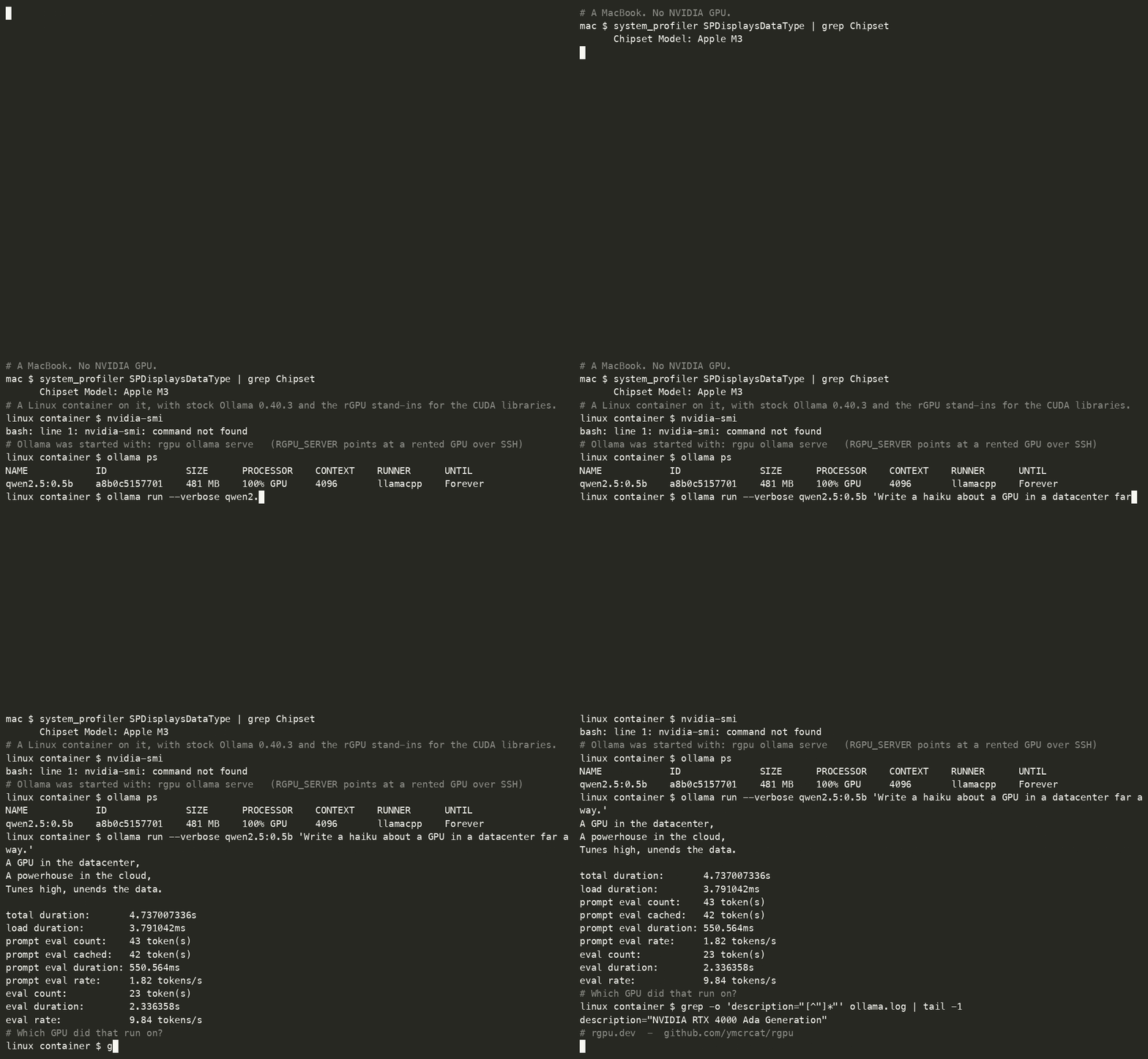
The launcher has also run end to end from a Linux arm64 container on an M3 Mac to an RTX 4000 Ada over SSH, as recorded below. The model was loaded before recording; generation is at real speed. Larger models have not been tried.
If the goal is only to use Ollama with a remote GPU, run Ollama on the GPU host
and point OLLAMA_HOST at it. That is full speed and needs none of this. The
steps below exercise the shim.
Set up
On the GPU host
Start rgpu-server with the real CUDA 12 cuBLAS libraries. This example
uses the libraries bundled with a stock Linux Ollama installation on the GPU
host; adjust REAL if they are installed elsewhere. Run the server directly:
wrapping it in rgpu would preload the client stand-ins into the server.
REAL=/usr/local/lib/ollama/cuda_v12
RGPU_CUBLAS=$REAL/libcublas.so.12 RGPU_CUBLASLT=$REAL/libcublasLt.so.12 \
LD_LIBRARY_PATH=$REAL ~/rgpu/build/rgpu-server
For a remote host, use the SSH tunnel.
On the Linux client
Install the launcher once, from the rGPU checkout, using a build that matches the client's architecture:
sudo bash scripts/install.sh --from buildThis installs the stand-ins under /opt/rgpu and the rgpu command in
/usr/local/bin. It is separate from the Python rgpu-run command.
Stop any existing Ollama service that occupies the client port, then start Ollama through the launcher:
OLLAMA_LLM_LIBRARY=cuda_v12 \
GGML_CUDA_DISABLE_GRAPHS=1 \
RGPU_SERVER=127.0.0.1:9713 \
rgpu ollama serve
OLLAMA_LLM_LIBRARY=cuda_v12 selects the CUDA 12 backend. You do not need to
copy Ollama or delete its CUDA 13 or Vulkan directories. Ollama passes the
launcher's LD_PRELOAD to its GPU-discovery and inference subprocesses.
GGML_CUDA_DISABLE_GRAPHS=1 is required. llama.cpp otherwise uses CUDA graph
capture, and the shim does not implement cudaGraphExecUpdate.
In another client terminal, pull and run a model:
ollama run qwen2.5:0.5b "Explain why the sky is blue."
ollama ps
Ollama's server log should name the GPU under inference compute, with
library=CUDA, and ollama ps should show the model using GPU memory in the
PROCESSOR column. A response alone is not proof: if the log says
library=cpu, Ollama fell back to the CPU. Check the server connection, the
client library architecture, and that ollama serve was started through rgpu.
What to expect
Earlier measurements with Ollama on the same machine as the server:
- Results. With llama.cpp's server run directly at temperature 0, 320 generated tokens matched the native run exactly.
- Round trips. One per generated token, the download of the result.
Without the default
RGPU_LAZY_SYNCrule it is 21. - Speed. Set
num_threadto 1; see below. On an A40 with client and server on the same machine, Ollama then generated about 180 tokens per second through rGPU against about 445 native, 2.5 times slower. Over a network, add about one round trip of latency per token. - Cleanup. A client killed mid-run has its GPU memory released when its session expires.
Use one CPU thread
llama.cpp starts one CPU thread per core it can see, and they busy-wait between tokens even when the whole model is on the GPU. On a container that shows many cores but is allowed only a few, they use up the CPU allowance and the kernel pauses the whole process. This slows native runs too, but rGPU more, because each token also needs the client and the server woken.
Measured on a pod showing 96 cores with an allowance of 8.5, in tokens per second:
| Default (48 threads) | num_thread 1 | |
|---|---|---|
| Native Ollama | 161 | 437 to 450 |
| Ollama through rGPU | 49 | 174 to 226 |
Set it per request with "options": {"num_thread": 1}, in ollama run with
/set parameter num_thread 1, or in a Modelfile with PARAMETER num_thread 1.
With llama.cpp's own server the flag is -t 1.
Over a network
The link sets the pace. From a Mac to a GPU 123 ms away, with 1.5 MiB/s of upload:
- Loading took about seven minutes: the model's weights, 374 MiB here,
are uploaded through the tunnel. Ollama gives a load five minutes by
default, so set
OLLAMA_LOAD_TIMEOUT=30mor the load is abandoned. - Generation ran at about 3 tokens per second. Each token is one round trip, and llama.cpp downloads the model's full output for it, 0.58 MiB for this model, to choose the token on the client.
- Results matched the native run exactly, across the two machines and the two processor types.
For a Linux arm64 container on a Mac, build matching stand-ins with
./scripts/build_client.sh, then install the launcher inside the container.
Point RGPU_SERVER at the tunnel, such as host.docker.internal:9713, and add
OLLAMA_LOAD_TIMEOUT=30m to the launch command. The measurements above came
from an earlier build and a copied installation. The recording at the top of
this page used the launcher and the current build: loading took about four
minutes, and a 23-token reply ran at 9.8 tokens per second to an RTX 4000 Ada.